Mandala Multifinance is a consumer financing company specialized in motorcycle, working capital, and multipurpose financing. MantisHub is an internal tool used at Mandala Multifinance to track the entire applicant journey—from application booking to consumer disbursement.

Type
Work
Role
User experience, User Interface, Research
Duration
Aug - Sept 2024
Project Brief
Credit's Approval: Highlighting the applicant’s installment scoring
Talked to parents and gathered informations from different perspectives with parents who has children aged 3-6 years old.
With hundreds of applicants daily from across Indonesia, flow needs to be highly efficient in filtering and evaluating applicants quickly, ensuring decision-makers have the best insights for their assessments to see applicant’s creditworthiness scoring and ratio
Problems #1
There are additional requirements to be considered for applicant approval
The authorized official, as the user, needs to carefully approve customer applicants for credit loans and assess their creditworthiness. However, the additional requirements for evaluating creditworthiness force them to be even more cautious in their decision-making which will take longer time

Problems #2
Scattered Information in the internal tools
The additional requirement of assessing applicants with scattered information can lead users to repeatedly open multiple pages. Which results can be painful for user to make loan credit’s approval
In the internal tools
Each tab provides specific details for users to assess the applicant's information. Key creditworthiness data is distributed across multiple tabs or sections, requiring users to navigate between them for a complete evaluation.

Enhancement Idea
How might we optimize the process in assessing creditworthiness more efficiently with less overwhelming?
Desk Research
The effects of layout order
Too much important informations to be highlighted. A complexity informations needed to be simplify, in order to do that I found several way to be implemented
The using Gestalt Principle
Similarity. By grouping of similar information, can lead the focus of user and less overwhelmed
Proximity. Defining hierarchies by placing objects closer and create certain groups
The layout order
a study about layout order effects found if the complexity of dashboard is affected by degree of visual symmetry and visual unity of the layout and position of the core chart.
Using of white space
It is used to guide user to focus on specific content delivered
Design Exploration
Making user feel less overwhelmed
Organizing the important information
A user survey was once conducted, I gathered feedback on their experience with MantisHub. Users mentioned issue such as: "There is too much unnecessary information."
To address these concerns, I began by grouping similar information and carefully utilizing white space to guide users' focus on what matters most and more efficient.


In my first exploration, both alternative 1 and 2, I tried to be more compact in grouping and not taking too much area in the desktop view. But it turned out to be too tight and too little space left.
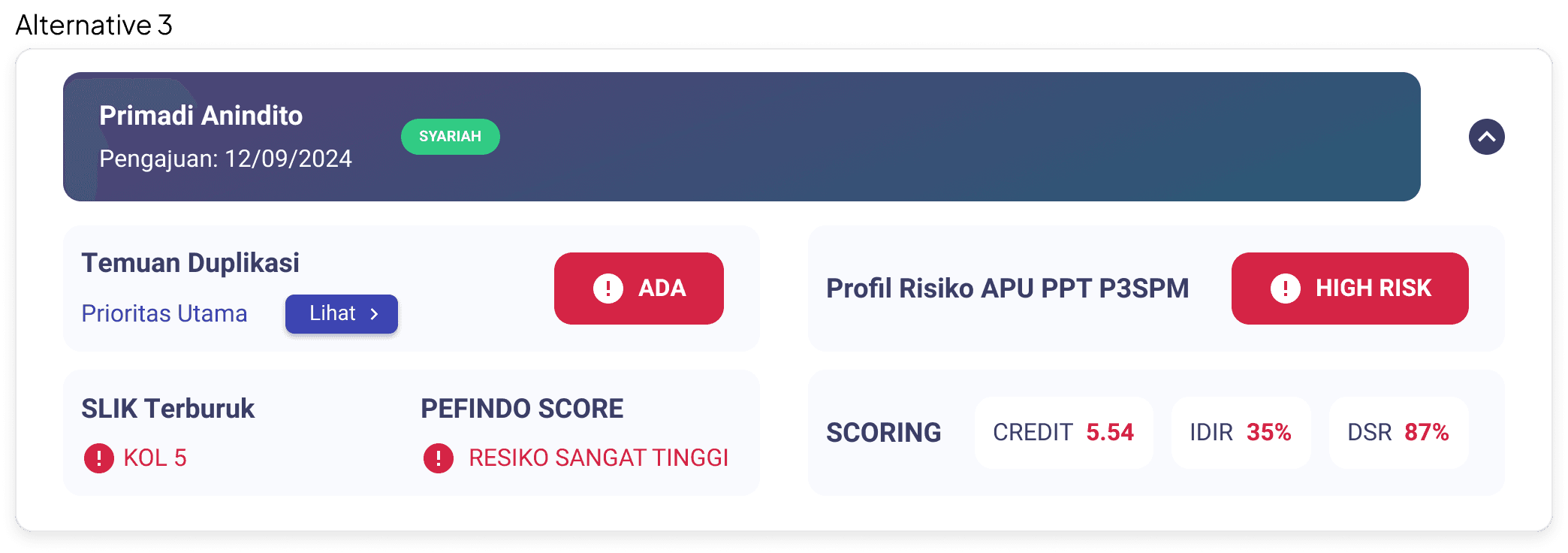

I continued exploring ways to optimize white space and create an efficient layout. In both alternatives 3 and 4, I aimed for a more spacious design, giving users the option to view all information at once or minimize it to save space.

Variant state component
Since customer conditions vary and the business uses different parameters to score them, having diverse components that align with the MantisHub design system is essential.

Optimizing color scheme for variant
Using a color scheme as grading to indicate different state conditions helps users understand which customer requires attention at each level.

Result Analysis
Heatmap: Analyzing user's attention
I compared two different designs to determine which one would better capture users' attention and highlight the important information. Due to limited time I had in the research process, to support this analysis, I used EyeQuant as a tool to assess the heatmap and identify areas of focus.

Main Focus for Design A:
The red-highlighted areas indicate that users are primarily focused on the titles and CTA buttons, while the crucial information related to creditworthiness, which is vital for credit approval decisions, receives significantly less attention.
Main Focus for Design B:
In contrast to Design A, the red-highlighted areas in Design B successfully capture user attention towards the credit value considerations, making it easier for users to focus on the critical information needed for credit approval decisions.
Our team moved forward with Design B (Alternative 3) to meet the requirements, opting for a maximized card view as the default. This approach was chosen to better capture users' attention and reduce the need for excessive clicks and interactions
So, I highlighted that…
The heatmap shows that the user's main focus is marked in red, indicating that the red component or colored dominantly captures the user's attention
By analyzing the heatmap, it’s clear that users' attention is primarily drawn to elements with color in bold, particularly the card design. It is shown in design B with highlighted information of creditworthiness level is gain more attention.
However, it was found that the highlighted color used for another creditworthiness assessment information does not effectively grab the user's attention from design A compared to design B. As the information in design A is not as bold and neat placed as design B.
Reflection
What I learned
Less is more (efficient, effort)
I faced the challenge of presenting complete information in a compact component, while ensuring that users could easily view and understand the data. I learned through prioritizing the hierarchy information can help to order the layout
Design Consistency
In order to create a compact component without deviating too much from the existing design, I explored within the constraints of our current design system, allowing only limited customization.